Your process, run end to end, without code.
Design a multi-stage process in Workflow Studio: applications, credentialing, renewals, reviews, approvals. Publish it, and AssociationServer runs every case from first submission to final decision, on one member record.
Every case, every step, on the record.
Every step has a gate.
A case can't move forward while something is outstanding: a missing document, an unpaid balance, a failed check. Staff clear some items. Members clear others themselves, inside the workflow.
Dates move things along.
Steps can advance on a date or after a set time: closing dates, expiries, renewals.
Every change is on the record.
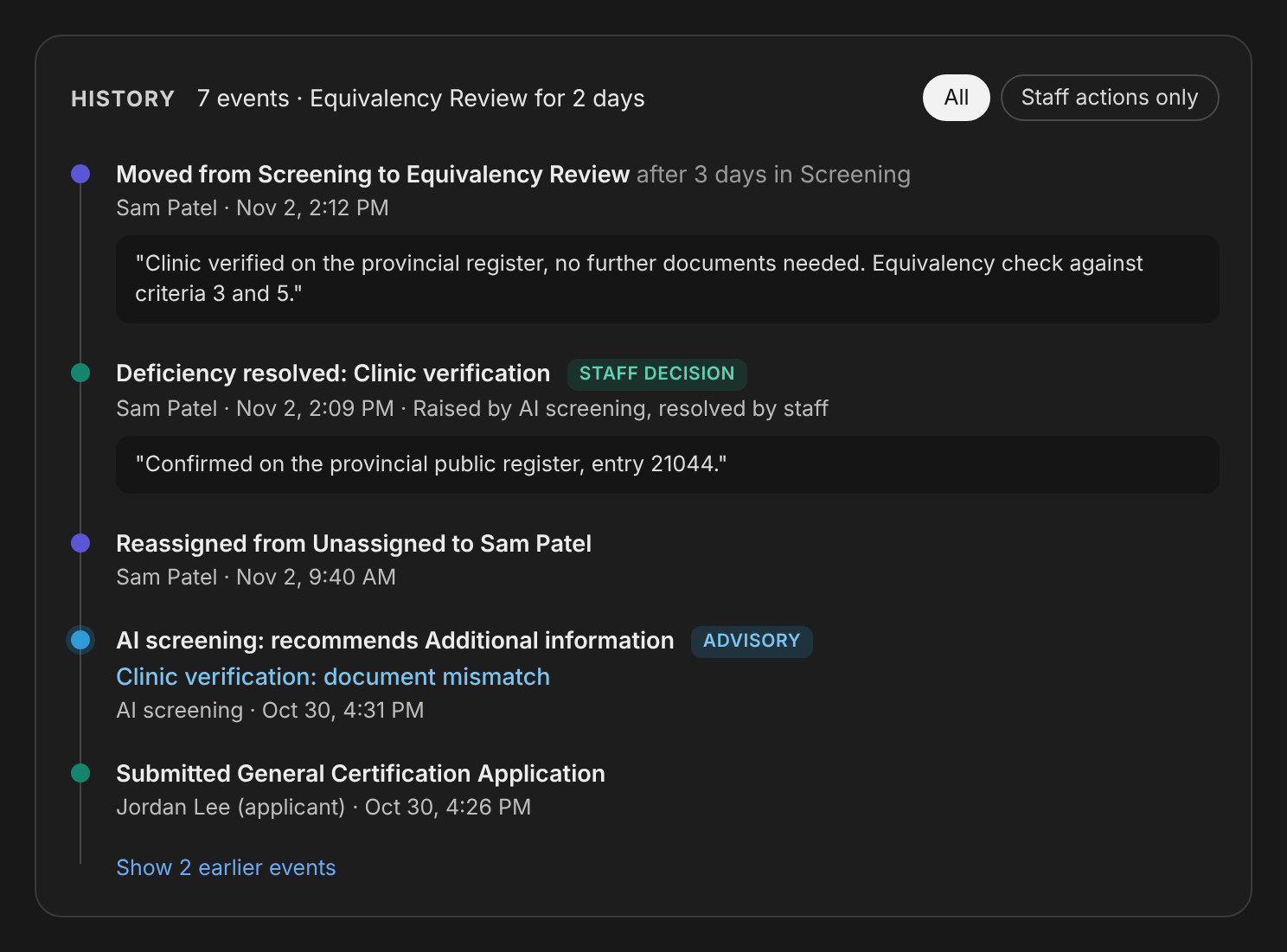
Each move is recorded, with who made it and why, and shown as a timeline on the record. Your audit trail is complete without anyone having to keep one.
Staff can step back.
When a case needs to return to an earlier step, staff can move it back, and that's recorded too.
AI recommends. People decide.
In applications, AI Review checks documents and recommends a next step. It never declines an applicant. Every decline is a staff decision, and your association decides whether clear approvals can be automated.
Built by configuration.
Multi-stage applications, conditional branching, and field- and page-level verification are set up in the Studios, without code.
Review, on one screen
Staff review a case inside AssociationServer, not in a separate tool. One screen shows the open deficiencies, the AI's document findings, a check against your criteria, the case history, and the complete application exactly as it was submitted on your website. Staff act on the case from the same screen.
External reviewers are a stage in the same workflow. Each examiner works in a review portal secured to them. For awards and grants, scores can be combined across examiners and reviews can be blind. Both are activated when your program needs them.
The applicant's side
Applicants follow their case in the Workflow Status panel on your website. When a stage has a fee, they pay online. When you ask for supplemental documents, they upload them there.
Watch every case move
The Pipeline dashboard shows every workflow live: cases in flight, cases blocked, cases needing action, outstanding deficiencies, fees due, a tile per workflow, and a filter by staff member. Open any case in a review drawer with its full history.
Start from a ready-made workflow
Ready-made workflows your staff add at no charge and adjust in the Studios. If a blueprint needs our configuration expertise, we quote that work before we start. Five of them earn non-dues revenue:
- Job Boards. Employers pay to post; members find careers.
- Member Event Posting. Members promote their own events through a paid submission.
- Member Microsites. Premium member listings with their own microsite and location search.
- Rotating Ad Sales. Sell rotating ad slots across your site.
- Paid CE and Certification. Charge for credit tracking, certification and renewals.
More blueprints: Certification · Applications & Reviews · CE & Credits · Awards & Recognition · Nominations & Elections · Grants & Bursaries · Mentoring · Surveys & Feedback · Fundraising & Giving · Member Directory · Shift Management · Bilingual Workflows
The engine underneath.
Workflow Studio is the authoring layer. Every process a designer builds compiles to a state machine: defined states, the transitions allowed between them, and the deficiencies that gate each transition. That engine has run in production for Oasis clients since 2016. Workflow Studio is the newer designer on top of it.
- Deficiency model: staff-actioned and member-actioned deficiencies. A transition is blocked while any deficiency is open.
- Scheduled transitions: by date or by elapsed time.
- History: every state change is recorded, with who made it, when, and the reason.
- Backward transitions: permitted to authorized staff, and audited.
- AI adjudication: advisory only, on Azure OpenAI in a Canadian region. No AI path can decline an applicant.
- Data: each client's data lives in its own database, in Microsoft Azure Canada Central and Canada East.
See a workflow run on your process
Book a demo and we'll walk a case from submission to decision.